ORM / ARM
glTF, Unreal, Substance, Godot
- ROcclusion
- GRoughness
- BMetallic
- Anot used
 Packinator
Texture channel packer for Windows
Drop your AO, roughness, metallic and friends onto the Packinator and it stuffs them into the channels of one texture, ready for Unity, Unreal or glTF. No image editor, no channel juggling.
30 days free, everything unlocked. Windows 10 and 11.
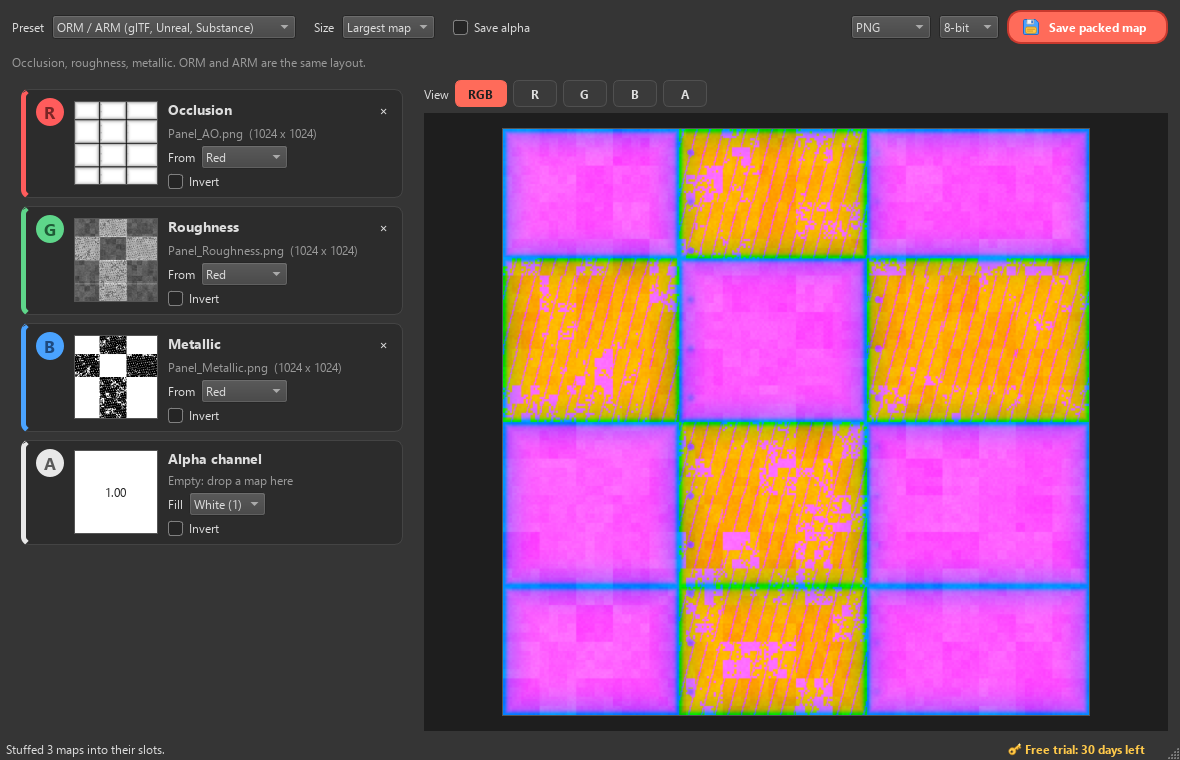
Pick your engine and the slots label themselves. Drop a pile of maps and
names like _AO, _Roughness and _Metallic
land in the right channels by themselves.
glTF, Unreal, Substance, Godot
Megascans ORDp
High Definition Render Pipeline
URP and Built-in
Each slot takes red, green, blue, alpha or luminance from its map. Swizzle an existing packed map as easily as making a new one.
Roughness to smoothness and back with the Invert box. Unity's mask maps do it for you.
No detail mask? Empty slots fill with black, white or any value you like.
Mixed 1K and 4K maps? They're resized to the biggest, or to any size you choose.
See the packed texture as you go, or check just R, G, B or A as a greyscale view.
Saves PNG, TGA, TIFF and EXR, from 8-bit to 32-bit float. Reads EXR, PSD, JPG and more.
Maps are data, so nothing gets colour-converted and alpha is never premultiplied. A 128 goes in, a 128 comes out.
Maps plop into their slots and the Packinator squeezes them together when you save. It's a bit silly. That's the point.
Hit Save and the Packinator gets to work, squeezing your channels into one tile while the file is written. It never slows the save down.
Drop your maps on the window. They find their slots by name.
ORM, Unreal, Unity HDRP or URP. Or set every slot yourself.
Save PNG, TGA, TIFF or EXR, at full resolution.
Licenses go on sale very soon. Until then the free trial has everything unlocked.
G PayApple PayCardPayPal
Secure checkout by Lemon Squeezy, who handle payment and sales tax.
Not sure yet? Try it free for 30 days, everything unlocked.
Greyscale maps like occlusion, roughness and metallic only need one channel each, so game engines like them packed together into the red, green, blue and alpha of a single texture. Fewer textures means less memory and fewer lookups. Packinator does the packing so you don't have to wrangle channels in an image editor.
Anything that reads packed textures. There are presets for glTF and Unreal (ORM / ARM), Megascans' Unreal layout (ORDp), Unity HDRP's mask map and Unity URP's metallic smoothness, plus a Custom setup for everything else: Godot, Blender, Three.js, your own engine.
No. Texture maps are data, so Packinator never colour-converts them, and the alpha channel is kept as data rather than transparency, so nothing gets premultiplied. Values only change if you ask: Invert, or saving a float map into 8 bits.
Download Packinator and use all of it for 30 days. No sign-up, no card. The days left show in the bottom right corner of the app.
You can still open Packinator, load maps and preview the pack, but saving needs a license. Buy one and everything is unlocked again straight away.
Your license key is emailed to you as soon as you pay. In Packinator, click the gold key in the bottom right, paste the key and press Activate. That's it.
Yes, on up to 3 of your own PCs. Changing computers? Click the key in Packinator and choose "Remove from this PC" to free up a spot.
Yes. Packinator is new, so Windows SmartScreen doesn't know it yet. Click "More info", then "Run anyway". The installer doesn't need admin rights, and you can remove Packinator any time from Windows Settings, Apps.
Packinator tells you. When there's a new version, a green "Update" button appears in the bottom right; click it and it updates itself in a few seconds. Your license comes along, so there's nothing to re-enter.
Not yet. Packinator is Windows only for now.
Never. Everything happens on your PC. It only goes online to check your license key with Lemon Squeezy (when you activate it, and every couple of weeks after) and to see if there's a new version, once a day.
If Packinator isn't for you, email us within 14 days of buying and we'll refund you. No hard feelings.